

What Is a Governed Slide Library? A Practical Guide for Medical Affairs
A regional medical director sends a note the week before a congress: is slide 14 in the KOL deck the version that cleared review in June? The deck is on the shared drive. The filename ends in FINAL_v3. The scientific communications lead opens it and cannot say. It looks right. The approval record lives in another system, attached to a PDF of the deck as it stood in June. Nothing on the slide itself says what version it is, what it is based on, or whether anyone signed off on it.
That is the gap a governed slide library closes.
A governed slide library manages the individual slide as a controlled asset, keeping its version, approval status, and supporting evidence connected as that slide is reused across presentations.
Why the presentation file is the wrong unit of control
Most content systems manage documents. A deck goes in as a file, gets a version number, moves through review, and comes out approved. That works as long as the deck stays whole.
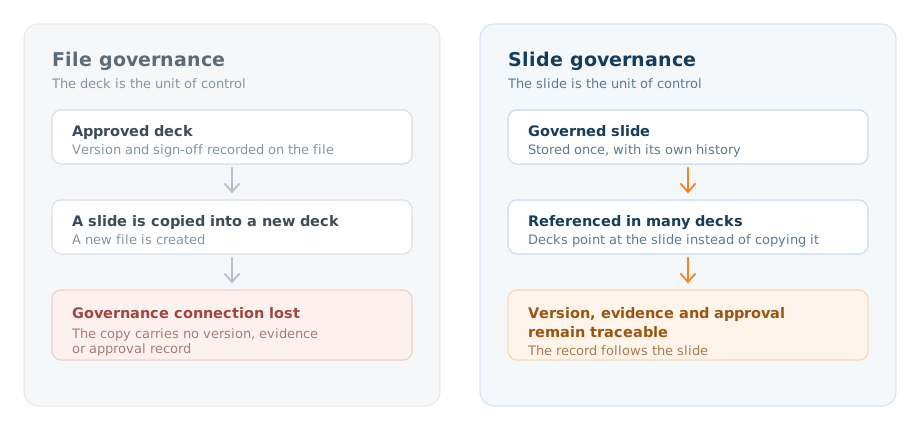
Decks do not stay whole. An MSL pulls six slides from the core deck and three from a congress deck to build something for Tuesday. A publications team lifts a forest plot into a poster. Each of those moves creates a new file, and the file-level controls stay behind with the original.
So approval, version, and evidence get recorded against a container people do not actually reuse. What they reuse is the slide. And the slide, once copied, carries none of that record with it.
What governed presentation management means in practice
Presentation governance treats slides as the governed assets and decks as assemblies of them. In practice that means four things:
- Each slide is stored once and identified individually, with its own history, rather than existing only as page 14 of a file.
- Decks reference slides instead of embedding copies, so a change to the slide reaches every deck that uses it.
- Status is recorded on the slide, so whoever opens a deck can see what is approved, what is in review, and what has been superseded.
- The record survives export. When a deck is downloaded as a working PowerPoint file, the slides inside still carry their identity and version. Decks that reference the library pick up changes automatically. A file already downloaded to a laptop does not rewrite itself, which is the point of vCheck: it identifies presentations in the field still running an older version of a slide, so someone can act on them.
That last point separates a governed Medical Affairs slide library from a well-organized folder. Folders govern the copy that stays put. A governed library tracks the copies that leave. The difference is simple: the governance follows the slide instead of stopping at the repository.
Three things that should follow every scientific slide
A scientific slide makes claims. To stand behind a claim, a team needs three pieces of information attached to the slide itself, not to a deck, a review ticket, or an email thread.
Version. Which revision this is, what changed from the previous one, and whether a newer one exists. Without slide version control, “current” is a guess based on file dates.
Evidence. The publication, data table, or internal report the slide draws on. With evidence linking, the reference travels with the slide, so an MSL can answer “what is that based on” without leaving the deck.
Approval state. Who approved it, when, and under what conditions. Approval workflows that operate at slide level mean a deck built from approved slides gives reviewers a clear record of the approval status behind each component, and a deck with one unapproved slide gets flagged rather than passed on faith.
If any of the three is missing, the slide can still be shown, but nobody can vouch for it quickly. If all three are present, the slide can be reused with far greater confidence and traceability.
How slide-level governance changes reuse, review, and field use
Reuse gets simpler. For a Medical Affairs team, that means people search for an approved slide by what it says and place it in a deck. Nobody asks around for the file that had it or rebuilds it from memory.
Review gets narrower. When a slide changes, reviewers look at that slide and its evidence, not at a 60-slide deck to find the two that moved. Reviewers can immediately distinguish previously approved content from the slides that have changed, making review more focused.
Field use gets safer. Decks that reference the library update when the library does. For decks already downloaded, vCheck (a SlideSource Library feature) flags the ones running outdated slides, so the medical team can see where older versions are still in use. External portals give outside partners a view of current approved material instead of a file that will age on their laptop.
None of this asks MSLs or writers to change how they build. It changes what they build from.
Where a governed slide library fits alongside Veeva
Many Medical Affairs teams run Veeva Vault as the system of record for approved materials, and it does that job well. A governed slide library does not replace it. It is slide management software for the PowerPoint layer, where people actually assemble and present, and it picks up where the document-level record ends.
Vault holds the approved source and its audit trail. The slide library manages the individual slides as they are reused and delivered to the field, and keeps the record attached once a slide leaves. SlideSource Library’s Veeva Vault integration is built on that split, with Vault staying authoritative.
The same logic applies to SharePoint, a DAM, or a shared drive. Those systems store files. Scientific content management at slide level is a different job, and it starts where file storage stops.
A simple test
Whether slide 14 is the June version should take seconds to answer. That is a fair test of whether your presentation content is governed or only stored. If the answer has to be reconstructed from filenames and inbox history, the deck is a file. The Life Sciences Presentation Evidence Integrity Checklist is a short way to run that test across your own content. If the slide can tell you its version, its evidence, and its approval state on its own, you have a governed slide library, whatever you call it.
Common questions
What is a governed slide library?
A governed slide library manages each slide as a controlled asset rather than managing decks as files. The slide keeps its version history, the evidence behind it, and its approval status, and those stay attached as the slide is reused across presentations.
How is a governed slide library different from SharePoint or a DAM?
SharePoint and digital asset managers store and version files. They govern the copy that stays in the repository. A governed slide library governs the individual slides inside those files, including the copies that get pulled into new decks, so version, evidence, and approval status travel with the slide.
Does a governed slide library replace Veeva Vault?
No. Vault remains the system of record for approved material and keeps its audit trail. A governed slide library works at the PowerPoint layer, where teams actually assemble and present, and manages slides as they are reused and delivered to the field.
What happens when a governed slide has already been downloaded into PowerPoint?
A downloaded file does not update itself. Decks that reference the library pick up changes automatically, and for presentations already in the field, vCheck identifies the ones still running an older version of a slide so the team can act on them.
See SlideSource Library in action
See how SlideSource Library keeps scientific slides current, approved, and reusable across your teams.