

Governed Presentation and Slide Management for Life Sciences Teams
Trace every slide to its source, keep every version current, and stay in control of every presentation.
From scattered PowerPoint files to governed presentation management
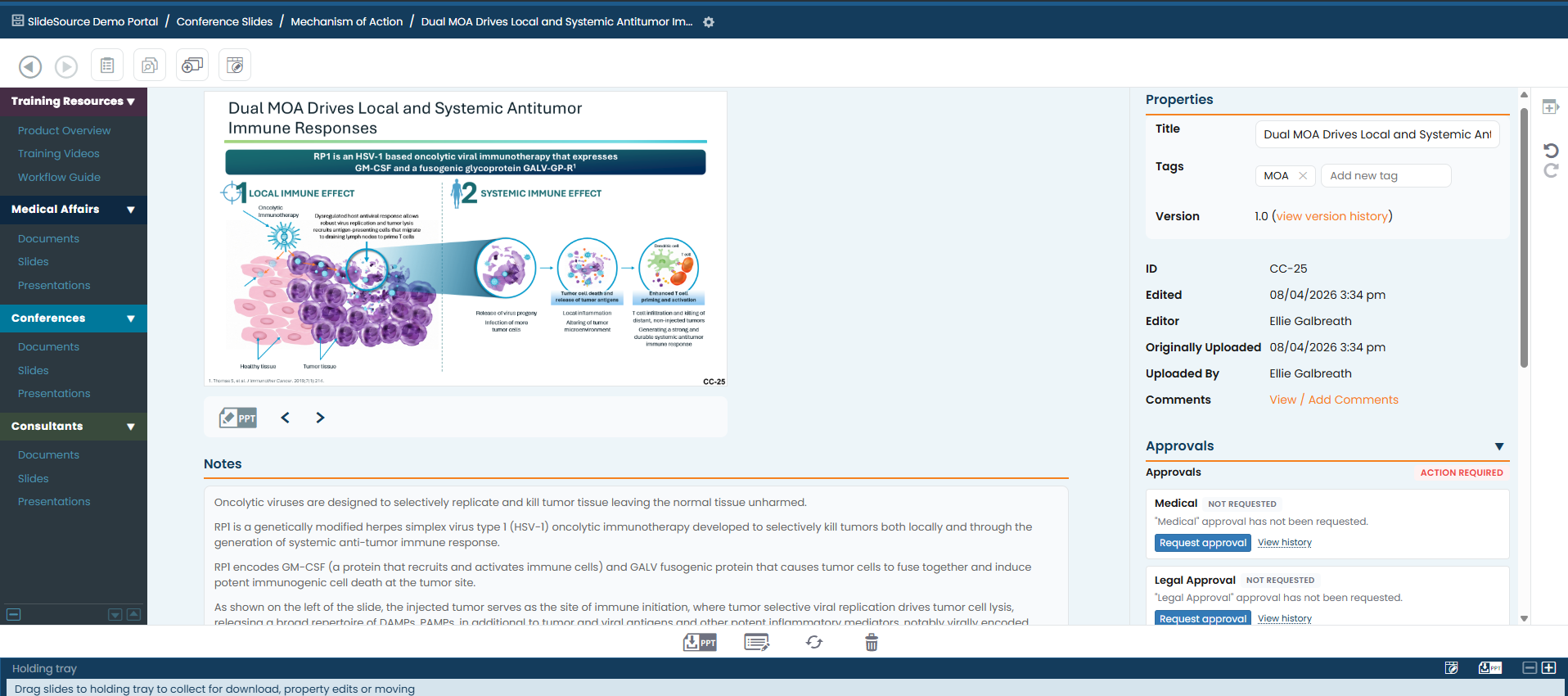
SlideSource Library 3.0 gives scientific, medical, and regulatory teams one place to manage slides and supporting documents, track versions and approvals, and control access to content. Built to work with PowerPoint, it makes it easier to find the right content, build presentations, keep slides up to date, and reuse approved materials.
Built by a team trusted for high-stakes life sciences presentations since 1986.
More control over the full lifecycle of scientific presentation content
SlideSource Library 3.0 introduces major advances in how scientific teams review, maintain, support, and share governed presentation content.
Flexible approval workflows
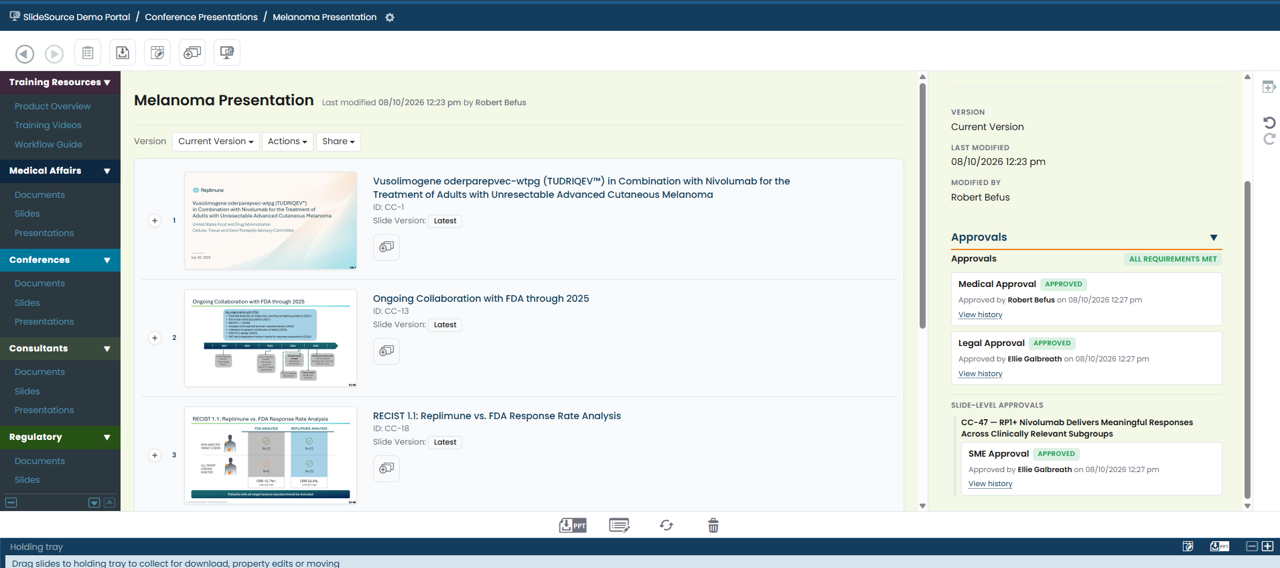
Approve individual slides, complete presentations, or supporting documents, with approval tied to the exact version reviewed.
Lifecycle management
Set review and expiration dates, automate reminders, and identify content that needs to be refreshed or archived.
Citation extraction and reference validation
Extract and validate citations at the slide level and keep supporting evidence connected to reusable content.
Consultant Portals
Give KOLs, agencies, consultants, and other external collaborators controlled access to selected content.
Substantially redesigned interface
Bring current versions, approvals, review activity, and administrative controls closer to the work itself.
Scientific content was never meant to live in scattered PowerPoint files
Losing a slide is one risk. A bigger one is losing confidence in which version is actually approved, and what evidence supports it.
- Stale data still in circulation
- Claims without a visible source
- Approvals no one can reconstruct
- Field decks that have quietly drifted
- Duplicated, conflicting versions
Life Sciences Presentation Evidence Integrity Checklist
A practical checklist for keeping scientific presentation content current, traceable, and defensible.
One governed home for your scientific content
Keep every slide current
Update scientific content once and maintain confidence across every presentation that uses it. Slides live once; decks reference them rather than copying them.
Learn moreMake every claim traceable
Connect slides to the publications, study reports, regulatory documents, and source files behind them, so the evidence is always one click away.
Learn moreGovern review and approval
Capture who approved what, when, and with what comments through configurable approval workflows and a complete audit trail.
Learn moreStay PowerPoint-native
Teams build, reuse, and update presentations in the PowerPoint they already use. Governance works at the slide level, so there is no new authoring tool to learn.
Learn moreHelp teams build decks faster
Give teams a searchable, approved slide pool for assembling presentations. No more starting from old files or rebuilding from scratch.
Learn moreControl access inside and outside the organization
Give internal teams, MSLs, consultants, KOLs, and advisory boards access to only the content they should see.
Learn moreWhat happens when a key scientific slide changes?
- 1
The data changes.
- 2
The source slide is updated once.
- 3
Supporting evidence is reviewed.
- 4
The approval workflow is completed.
- 5
Every presentation using the slide reflects the current version, and vCheck flags outdated downloaded decks.
How SlideSource Library works
A workflow built around how scientific, medical, and regulatory teams actually create, govern, and keep presentation content current.
For the step-by-step detail, read the SlideSource Library guide.
- 1
Create a governed slide library
Organize by product, indication, audience, region, evidence type, content owner, or workflow.
- 2
Attach the evidence to each slide
Attach publications, study reports, regulatory documents, and source files directly to the slides they support.
- 3
Govern review and approval
Route content through configurable scientific, medical, legal, regulatory, or SME review workflows.
- 4
Build decks from approved source slides
Assemble PowerPoint decks from approved source slides without breaking version control.
- 5
Keep content current over time
Use version history, lifecycle review, expiration alerts, and vCheck to identify outdated content and downloaded decks.
Choose the path that matches how your teams work
Medical Affairs
One governed library for the whole function, connecting Scientific Communications, Field Medical, Medical Information, congress, and advisory board work to the same approved science.
See the Medical Affairs workflowScientific Communications
Manage platform decks, congress materials, publication-support slides, and the evidence behind them as one governed source of truth.
See the Scientific Communications workflowField Medical
Give MSLs an approved slide pool they can search, assemble, and tailor. They get the flexibility they need without local decks drifting out of control.
Request a Field Medical walkthroughPreparing for an FDA Advisory Committee or another high-stakes regulatory meeting? SlideSource Library also powers regulatory meeting support, delivered as a focused project alongside SlideSource's broader Advisory Committee work.
Works alongside Veeva Vault
SlideSource Library works alongside Veeva Vault where teams need a focused, PowerPoint-native presentation and evidence management layer.
It complements your content ecosystem by managing the presentation layer: slide reuse, deck assembly, version control, supporting evidence, approval visibility, and current, approved field decks.
Discuss integration fitWatch the SlideSource Library tutorials
Ten short videos, each about two minutes, covering the essentials: setting up your library, connecting slides to evidence, approval and governance, reusing approved content, and keeping downloaded slides current with vCheck.
Watch the tutorialsDesigned for enterprise use
SlideSource Library supports governance and helps teams maintain control of high-value scientific content. That is the bar a regulated organization expects before it puts its evidence anywhere.
- Role-based access so every user sees only what their role allows
- Single sign-on (SSO) via your existing identity provider
- Tenant isolation with database-level separation
- Microsoft Azure hosting with geo-replication
- Approval workflows & audit trail on every decision
- Lifecycle management with review and expiration cycles
- External access controls for portals and secure links
- Veeva Vault integration for connected content workflows
Proven where the stakes are highest
SlideSource Library supports core decks, backup slides, evidence files, Q&A preparation, and version control for FDA Advisory Committee meetings and other high-stakes regulatory engagements.
Paired with SlideSource’s presentation services, teams get both the technology and the hands-on support to stay in control when it matters most.
Explore regulatory meeting supportCommon questions
What is governed presentation management?
Governed presentation management keeps scientific slides, the presentations built from them, and the supporting documents behind each claim in one governed place. Teams can find approved content, see its version history, and trace every claim back to its source.
How is SlideSource Library different from a shared drive?
A shared drive stores files, but it can’t tell you which version is approved, what evidence supports a slide, or which decks already in the field are now out of date. SlideSource Library adds version control, slide-to-evidence linkage, approval history, and a check for which field decks are running outdated slides.
How does SlideSource Library help with slide version control?
Every slide has a full version history, presentations reference slides rather than copying them, and vCheck identifies downloaded decks running outdated slides. Teams can update the science once and see where older versions are still in use.
Can SlideSource Library support Scientific Communications teams?
Yes. Scientific Communications teams use it to manage platform decks, congress materials, publication-support slides, and the evidence behind them as one governed source of truth.
Can SlideSource Library support Field Medical teams?
Yes. MSLs and regional users can search an approved slide pool, assemble audience-specific decks, and stay confident they are using the current, approved version. They keep that flexibility without uncontrolled local deck drift.
Can SlideSource Library integrate with Veeva Vault?
Yes. SlideSource Library works alongside Veeva Vault, adding a focused, PowerPoint-native presentation and evidence management layer for slide reuse, deck assembly, and current, approved field decks.
Does SlideSource Library replace Veeva?
No. SlideSource Library works alongside Veeva Vault where teams need a focused, PowerPoint-native presentation and evidence management layer.
What is new in SlideSource Library 3.0?
Library 3.0 adds major advances in approval workflows, lifecycle management, citation and reference handling, controlled external portals, and a substantially redesigned user experience, while preserving the slide-level governance and PowerPoint-native workflows at the core of SlideSource Library.
Can external consultants, KOLs, or advisory board members access selected content?
Yes. Scoped external portals give outside experts secure access to only the content they should see, by login or secure link, with access logging and inactivity alerts.
See how SlideSource Library can support your team
Schedule a walkthrough focused on your workflow: Scientific Communications, Field Medical, Regulatory Meeting Support, Veeva-connected content, external portals, or security and governance.